Templates / Worksheets
Worksheets template
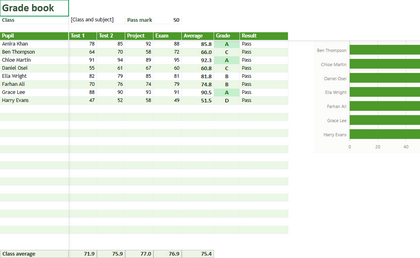
Grade book
Marks for a class: averages, grades and who needs support, with a chart.
Education
How to use it
It is an .xlsx workbook, so it opens in Rutba Office or in any other program that reads the format. The names, figures and people in it are made up; replace them with your own.
- 1
In Rutba Office, open Worksheets. Its New page shows the starter templates; pick this one, or use File, New from Template. You can also download the file above and open it in Worksheets or in any program that reads .xlsx.
- 2
Type your own figures over the sample ones. The cells that add up, average or carry totals hold formulas, so they recalculate as you type; leave those cells alone and change the figures they read.
- 3
Save it under a name of your own. The template itself is left as it was, ready for the next time.
More Worksheets templates
- Monthly budgetIncome and spending, planned against actual, with charts of where the money goes
- InvoiceAn invoice that adds itself up: quantities, prices, tax and the total due
- TimesheetA week of hours: start, finish and breaks, with the hours and pay worked out
- Loan calculatorThe monthly payment, the total interest and a year-by-year schedule for a loan
- To-do listA table of tasks with owners, due dates, priorities and progress
- Accounts ledgerA simple cash book: money in, money out and the running balance
- Expense reportExpenses to claim: dates, categories, VAT and receipts, with the total owed to you
- Stock listItems, counts and reorder levels, the stock value and what to order again
- Weekly plannerA week by the hour, the dates filled in, with priorities and notes for the week
Every template, inside the suite
Rutba Office is free, with no account and no trial. Its New page offers these templates, and it keeps your own beside them.