Worksheets
Real formulas, real recalculation
A spreadsheet with a real calculation engine, so a workbook recalculates in the right order instead of showing the values it was saved with.
What it does
Formulas
Excel 365’s newer functions work: LAMBDA with MAP and REDUCE, XMATCH, TEXTSPLIT, VSTACK, TAKE, SORTBY and the rest of that family, beside XLOOKUP, FILTER and UNIQUE. Typing a formula colours each reference and lets you point at the cells with a click or a drag.
The ribbon
The ribbon is laid out as Excel’s, with Protection, Page Layout view, outlines and subtotals, advanced filter, Flash Fill and Evaluate Formula where Excel keeps them.
PivotTables, and charts in cells
PivotTables have a field list, with PivotCharts and slicers beside them. Data bars, icon sets and colour scales are drawn in the cells.
Get & Transform
Get & Transform (Power Query) shapes, merges and appends data from a table or a CSV file, with Pivot Column, Unpivot, Conditional Column, Fill, Merge Columns and Extract among its steps.
Automate
Automate runs scripts in the shape of Excel’s Office Scripts, each in a sealed worker that cannot reach the network or your files.
Reading paper
Data from Picture reads a printed table in a photo or scan into cells, shown in a preview to check before they go in. Receipt or Invoice turns a pile of receipts into a row each, its date, supplier, tax and total checked against its own sums.
Right to left and Hijri dates
A sheet can read right to left, a date can be shown in the Hijri calendar with Excel’s own format codes, and numbers in Arabic-Indic or Urdu digits.
Quick on large files
A workbook that once took eleven minutes to open now takes six seconds, and a sixty-thousand-row sheet scrolls at about thirty milliseconds a frame.
Formatting that stays
A cell whose words have looks of their own, a bold word or a red phrase, shows them and keeps them when its words are edited. A workbook saved as .ods keeps its fonts, fills, borders, merged cells and column widths, and in the dark theme a cell keeps its own fill with words that read on it. Inspect Workbook and Redact clear a workbook before it travels.
Old files
Old files open to be saved as .xlsx: Lotus 1-2-3 worksheets with their formulas working again, dBASE and FoxPro tables with their memos, Access databases read only with a sheet for each table, and SYLK and DIF. For tables that point at each other, there is Data Files.
Reads and writes .xlsx, .ods, .csv and .tsv · opens .xls from Excel 2.1 to 2003 in full · opens Lotus 1-2-3, dBASE, Access, SYLK and DIF File formats
Microsoft and Microsoft Access are trademarks of the Microsoft group of companies. Rutba Office is not made by or connected with Microsoft.
The app at work
Pictures from the app itself. Press one to see it larger, or see Worksheets on the tour.

How-to films, in order
Short films, one task each. Nothing loads from YouTube until you press play.
Plays from YouTube when you press play. Watch on YouTube 1. Open an Excel workbook in Rutba Office Worksheets: formulas that recalculate
Plays from YouTube when you press play. Watch on YouTube 2. Format numbers, dates and conditional colours in Rutba Office Worksheets
Plays from YouTube when you press play. Watch on YouTube 3. Formulas in Rutba Office Worksheets: SUM, AVERAGE, IF and lookups
Plays from YouTube when you press play. Watch on YouTube 4. Sort, filter and format as a table in Rutba Office Worksheets
Plays from YouTube when you press play. Watch on YouTube 5. Make a chart from a range in Rutba Office Worksheets
Plays from YouTube when you press play. Watch on YouTube 7. Data from Picture in Rutba Office Worksheets: a printed table into cells
The Worksheets films, in order, on YouTubeHow-to films for the other apps
Templates to start from
They come with the app, under File, New from Template. Each one is here to download as well. The templates for the other apps.
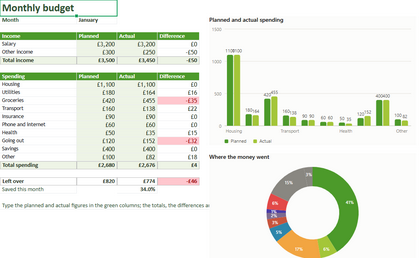
Monthly budget
Income and spending, planned against actual, with charts of where the money goes
Download .xlsx 7 KB
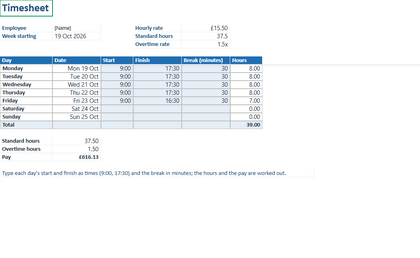
Timesheet
A week of hours: start, finish and breaks, with the hours and pay worked out
Download .xlsx 4 KB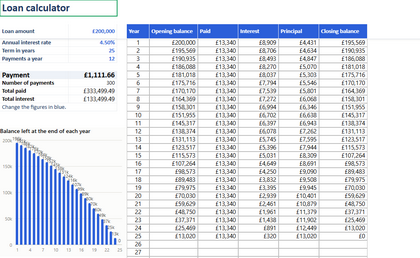
Loan calculator
The monthly payment, the total interest and a year-by-year schedule for a loan
Download .xlsx 8 KB
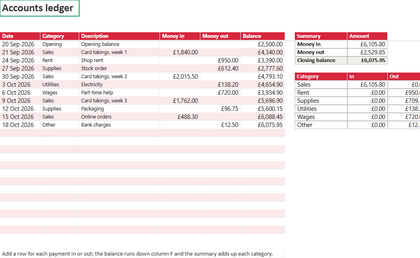
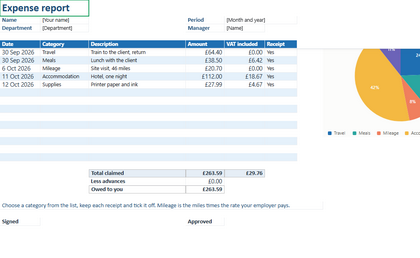
Expense report
Expenses to claim: dates, categories, VAT and receipts, with the total owed to you
Download .xlsx 7 KB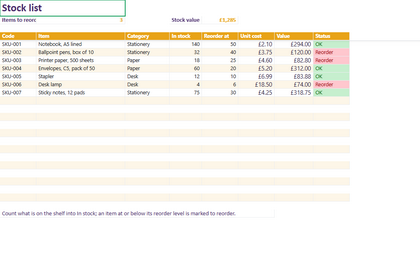
Stock list
Items, counts and reorder levels, the stock value and what to order again
Download .xlsx 6 KB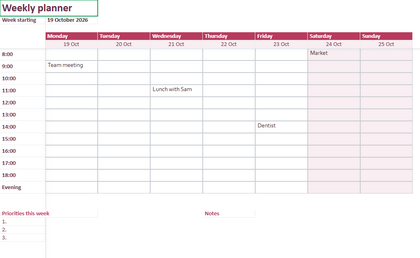
Weekly planner
A week by the hour, the dates filled in, with priorities and notes for the week
Download .xlsx 4 KB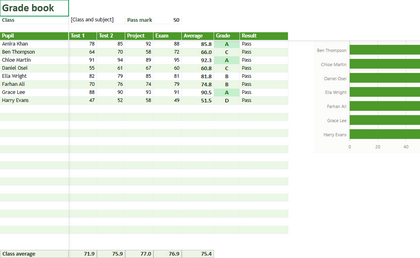
Grade book
Marks for a class: averages, grades and who needs support, with a chart
Download .xlsx 8 KB
Worksheets comes with Rutba Office
One free download, no account and no trial, and you choose the apps you want.