Templates / Documents
Documents template
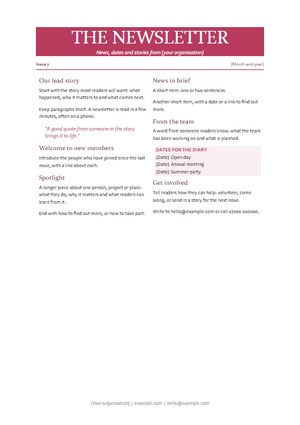
Newsletter
A newsletter with a masthead, two columns of stories and a dates panel.
BusinessHousehold
How to use it
It is a .docx document, so it opens in Rutba Office or in any other program that reads the format. The names, figures and people in it are made up; replace them with your own.
- 1
In Rutba Office, open Documents. Its New page shows the starter templates; pick this one, or use File, New from Template. You can also download the file above and open it in Documents or in any program that reads .docx.
- 2
Replace the made-up names, addresses, dates and figures with your own. The styles are already set, so whatever you type takes the template’s look: headings stay headings and body text stays body text.
- 3
Save it under a name of your own. The template itself is left as it was, ready for the next time.
More Documents templates
- LetterA business letter: your details, the date, the address, a subject line and a signature block
- CVA one-page CV: a profile, experience, education and skills
- ReportA report with a cover page, a table of contents and numbered sections
- InvoiceAn invoice to print or send: who it is from and to, the items, the total and how to pay
- Meeting minutesMinutes of a meeting: who came, what was discussed and decided, and who does what next
- Cover letterA letter to go with a job application: the role, what you bring and why this company
- MemoA short note to a team: to, from, the subject, the background and what happens now
- Meeting agendaWhat a meeting is for, its items with times and who leads each, and what to read first
- Project proposalA proposal with a summary, the need, the plan, the cost and the next steps
Every template, inside the suite
Rutba Office is free, with no account and no trial. Its New page offers these templates, and it keeps your own beside them.